


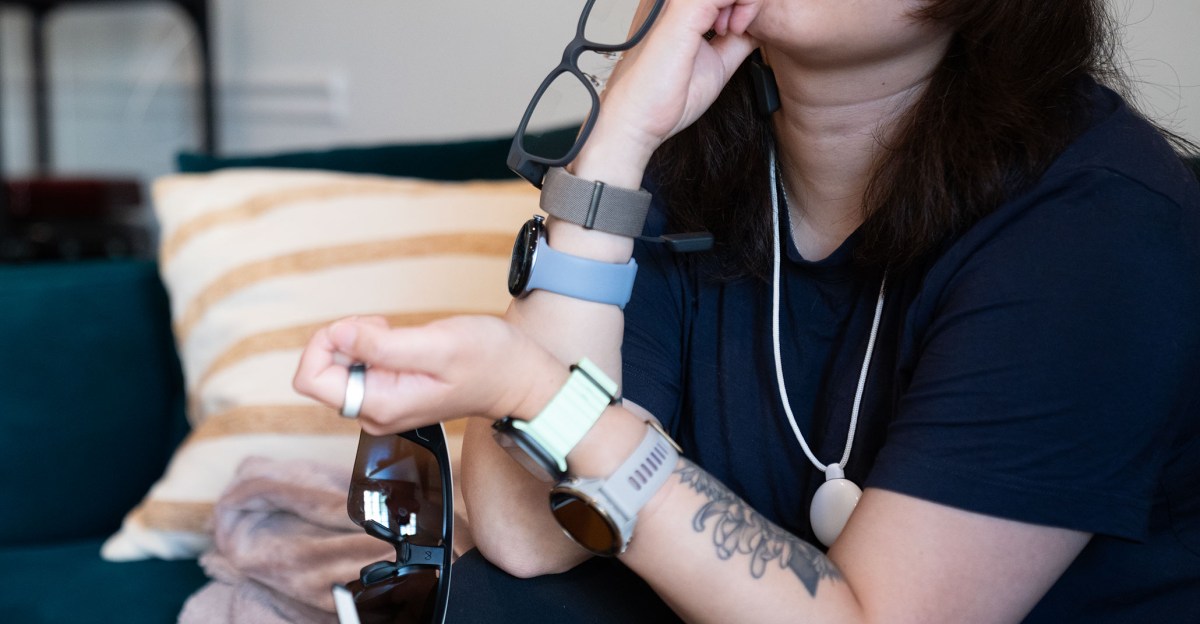
What I track in a day
Living an optimized, self-quantified life can get a little out of hand.
by Jul 24, 2026, 2:00 PM UTC
What I track in a day
Living an optimized, self-quantified life can get a little out of hand.
by Jul 24, 2026, 2:00 PM UTC Victoria Song is a senior reporter and author of the Optimizer newsletter. She has more than 13 years of experience reporting on wearables, health tech, and more. Before coming to The Verge, she worked for Gizmodo and PC Magazine.
This is Optimizer, a weekly newsletter sent from Verge senior reviewer Victoria Song that dissects and discusses the latest gizmos and potions that swear they’re going to change your life. Optimizer will be taking a two-week break and will be moving to Wednesdays starting August 12th. Opt in for Optimizer here.
My For You page thinks I love “What I eat in a day” videos. Most of the time, I watch them in a bid to suss out the latest wellness fads. But they can be an illuminating look into what people perceive to be healthy (or less-than-healthy) eating habits — even if a portion of them are likely faked for clout. In the same vein, I’ve gotten many requests from Verge readers over the years for a glimpse into what I track in a day as the resident senior wearables reviewer.
I get why there’s interest! Social media has reinforced the idea that if you do the same things as the “experts,” you too can achieve success. That’s why many people want to know what their favorite influencers eat in a day. But I’m a wearables reviewer, and that can require me to self-quantify in ways that I wouldn’t recommend for normal people. I’m tracking health to evaluate products and claims. That means things like how accurate GPS is or how workout intensity impacts battery life. I’m evaluating whether the metabolic insights derived by a $600 scale from my foot sweat will at all correlate with a CGM. Or, given a device’s feature set, I’m trying to figure out what the most common-sense ways are to incorporate a particular device into your daily life. Most people are fitness tracking to improve their health.
What I track in a day also changes depending on the time of year. Winter through early spring, for instance, is usually a lighter load because the product launch season is over. Summer through late fall, I’m like a ship covered in wearable barnacles. And as health companies start branching out into bodily fluids, my tracking regimen has never been more involved. Right now is an interesting moment to look into my nutso tracking schedule because the doctor cleared me to restart training, product launch season is just beginning, and for the past few weeks, I’ve started building a digital twin for my metabolism using Twin Health, a system that incorporates continuous glucose monitors, blood tests, and an array of other health sensors. So without further ado…
I try to test in product blocks. Right now, I’m focusing on metabolic tech. Ideally, you want to have control devices. If I’m testing a new smart ring, for instance, I should test it against the Oura Ring since that’s what most people will want to compare it to. Where possible, I want to also long-term test the Oura Ring against other sleep trackers across multiple form factors like, say, a smart bed and a smartwatch. And so on and so forth.
With that in mind, the current roster is made up of screenless fitness trackers, smart scales, and sleep trackers because these are often the components in metabolic tracking. For instance, the Dexcom G7 (a continuous glucose monitor for diabetics), the Twin Health scale, the Apple Watch Ultra 3, and a Medline blood pressure cuff are a series of sensors that feed into a system that will create my metabolic digital twin. Because Garmin released the Cirqa, a screenless tracker, it makes sense for me to compare it to the Oura Ring and Fitbit Air — which are also Whoop competitors. And because Withings just released its $600 BodyScan 2, it makes sense for me to compare it to its other scales and the Twin Health scale I’m already using.

So this testing block consists of:
- Apple Watch Ultra 3 (left wrist; I use this for a general baseline)
- Dexcom G7 (alternating left and right underarms)
- Twin Health scale
- Google Fitbit Air (right wrist)
- Garmin Cirqa (also right wrist)
- Oura Ring 5 (right index finger)
- Withings BodyScan 2
- Withings Body Smart
- Withings BodyFit
- Eight Sleep Pod 4 Ultra (another control device for sleep metrics)
- Polar H10 chest strap (workout use only)
The art of wearable testing is steeped in comparison. The first thing I do when I wake up — besides hit the snooze button — is sync all my wearables and take note of how much battery is left. Whenever a new gadget is added to the testing roster, I make sure to also compare the first 24 hours of battery use to the initial charge time. For example, this week I got my hands on a Garmin Cirqa. As of this writing, it hasn’t been on my wrist for a full 24 hours yet, but tomorrow morning, I’ll be noting how much battery is left after sleep and set an alarm for the 24-hour mark.
Once syncing is done, I’ll go into each wearable’s individual app and note how long it said I slept. So today, that’s the Apple Watch’s Health app, the Oura app, the Google Health app for the Fitbit Air, and the Eight Sleep app as a control. This is when I generally look to see which trackers are good at marking nightly disturbances, if I remember any. (For instance, a needy cat smothering my face with his rotund belly at 2:30AM because my spouse is downstairs making themself a snack and bedtime rules have been violated.) If there are readiness scores to compare, I’ll look at those too. This is also when I’ll skim any AI-generated daily insights. These days, all the metrics say pretty much the same thing. If there’s a significant deviation or if the AI says something particularly harebrained, I’ll note it for a closer investigation. (Like a smart bed telling my spouse to drink alcohol to cure snoring.)
Before getting out of bed, I’ll then open the Dexcom G7 app and note my fasting glucose level and any overnight patterns.

At this point, it’s imperative to pee but not drink water, after which I’ll remove all my wearables and pajamas for smart scale testing. First, I’ll hop on the Twin Health scale and sync the data to build my little digital metabolic twin. (This will take three months of testing minimum, so look for a story on this later this fall.) Then I’ll hop on the Withings Body Smart, the Withings BodyFit, and the Withings BodyScan 2. Unless you’re also a health tech reviewer, there’s absolutely no need to weigh yourself this much! Once a week, I’ll then take my blood pressure using a cuff that also syncs with the Twin Health app. I’ll take that reading and then also input it into the Apple Health, Oura, and Withings apps. When these readings are done, I’ll put back on all my wearables.
Before sitting down to work, I’ll take my master baseline wearable — the Apple Watch Ultra 3 — and write down the previous day’s step count and my morning weight comparisons into an analog notebook so I can reference these measurements later come review time.
The last part of the morning review is breakfast. Building my digital twin requires that I log my meals so I can view how certain foods impact my glucose levels. After eating, I set a timer for two hours to check the results on the Dexcom G7. Now that’s done, I can start my damn day. Usually, this takes about an hour in total.
After the morning review, I typically ignore my wearables and go about my day unless I’m testing for specific things or get an alert. These days, that translates to meals, workouts, low blood glucose notifications, or anomalous heart rate alerts. (The latter almost never happens.)
Meals follow the same routines, and after a year’s worth of continuous glucose monitoring testing, I am much more chill about how granular I get with food logging. I allow myself occasional Cheetos and cake. Workouts require more work.
Before a workout, I will bring up all the apps and navigate to the appropriate screen. This way I can blitz through starting each workout on each device. I will try starting and ending each workout on the device in the same exact order, from left to right. Hopefully, nothing goes wrong mid-workout. Several times, I’ll check metrics mid-workout if possible and compare. For example, on a run, I’ll note distance, average pace, heart rate zone, and heart rate at every half-mile interval. At the end of the workout, when everything is synced, I’ll review and jot everything into a spreadsheet for reference. It typically takes about 20 to 30 minutes on top of my workout. Once that’s done, I’ll check out how the workout impacted my glucose levels and weigh myself on all three scales again to see how they gauge dehydration/water loss and if there are any interesting body composition differences. Most of this testing is to assess consistency and doesn’t make it into the final review unless something is horribly wrong. (See: the original OnePlus Watch.)

For new gadgets, I’ll wear the Polar H10 chest strap as a control device just to make sure heart rate accuracy stays within about five to 10 beats per minute. (Some devices have a second or two more latency than others, but this is an acceptable margin for me.)
Sometimes, I will bork things up. For example, failing to ensure that every smartwatch gets a proper GPS signal before starting a run. At which point I will lightly bang my head against a wall and dramatically wail because it means I need a repeat test.
Nighttime is for long-term trend comparison and tagging. Once I roll into bed, that means reviewing things like medication logging in the Apple Health and Twin Health apps, my daily step count across all devices, and any metrics like stress. This is also a good time to review any AI summaries about how my day went. (Recently, all my wearables seem to think I’m dying and that my body is on the verge of falling apart. That said, AI wearable insights are often hilariously wrong.)
If an app has the option to tag or a journaling feature, this is when I’ll go and mass log them. Right now that mostly pertains to Oura and Eight Sleep. (Tagging is a way to see what factors impact sleep quality, like a late night out or sleeping with a cat.) By the time I’m done, I’m usually so zonked I pass out, and then it’s time to start the process all over again the next day.
After over a decade of doing this, I’ve gotten pretty quick at all this. But you can see why I harp on and on about data fatigue. There are ebbs and flows to testing. It tends to be most intense when I start and end a new testing block. For instance, next week, I’m about to start testing a whole new batch of wearables. But between blocks, I often take a 48-to-72-hour break where I don’t wear or track shit outside of workouts.

Some people will say that’s ruining the integrity of my data. I’m purposefully blowing up streaks! I say to live this wearable life long-term, I need those planned breaks or I’ll lose my marbles. Life happens, and if you hold yourself to an unsustainable rigor, your tracking system can’t realistically adapt to new circumstances. Basically, this is only what I track in a day for now. I often adapt this system depending on the products I’m testing and any long-term health goals.
But if there’s anything you take away from all this, I hope it’s this: More data and more devices aren’t better. Without a purpose or goal, this is just a bunch of time-wasting busywork. You have to be intentional about what you’re tracking, why, and which tool is likely to be best for your specific purpose. My cockamamie routines are not anything close to what I’d recommend for normal people. And don’t let the biohackers, hyper-optimizers, and tech companies tell you otherwise.
Follow topics and authors from this story to see more like this in your personalized homepage feed and to receive email updates.