


These camera-free smart glasses made me feel like Tony Stark
The MemoMind One make smart glasses more discreet but their AI-powered features are limited and privacy concerns persist.
The MemoMind One make smart glasses more discreet but their AI-powered features are limited and privacy concerns persist.
by Jun 29, 2026, 3:16 PM UTC
 Andrew Liszewski is a senior reporter who’s been covering and reviewing the latest gadgets and tech since 2006, but has loved all things electronic since he was a kid.
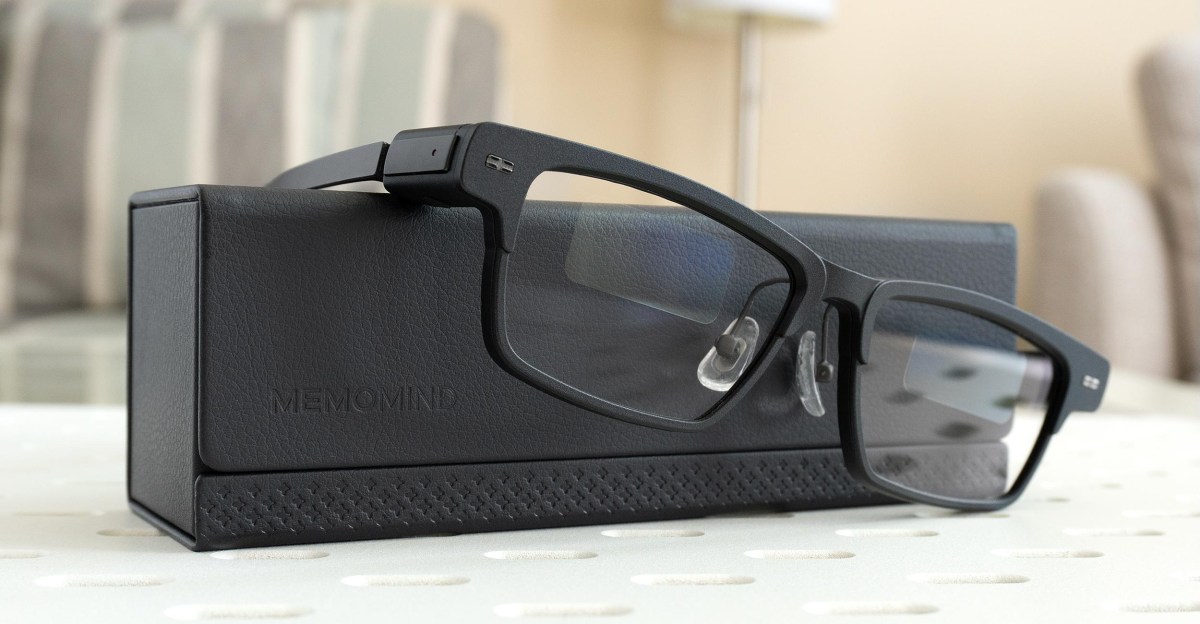
Xgimi, the Chinese company known for its all-in-one smart projectors, is expanding its portfolio with a new line of screen-equipped smart glasses that first debuted at CES 2026. Unlike AR glasses from companies like Meta and Snap, Xgimi’s new privacy-focused MemoMind One skip cameras for a lighter and more discreet design that helps hide their AI-powered smart functionality. After testing them for a week, I’m completely sold on the idea of having a screen floating in front of my eyes constantly feeding me useful information that no one else can see, but the MemoMind One don’t entirely deliver on my Tony Stark fantasies just yet. There’s some unique functionality I can’t get from my smart watch or phone, but I’m going to need a little more to justify dropping a half-grand (or more) on another smart wearable.
Xgimi is launching a Kickstarter for the glasses today, and the company plans to start shipping them in late July. There are three styles to choose from, and while full pricing will be $599, or $879 with prescription lenses, backing the Kickstarter discounts them to $399/$499. You can also customize the appearance of some of the styles with different colors, but that increases the price to $699/$879, which is discounted to $449/$499.
I tested a beta version with beta software and a buggy mobile app that’s missing features. So while I can’t weigh in on what the final experience will be like, after a week I was impressed with some features and frustrated with others.

Similar to the $800 Meta Ray-Ban Display glasses, the MemoMind One use a pair of micro-LED projectors and transparent (but noticeable) waveguide prisms in each lens to create a display only you can see. While the Ray-Ban Display goes full color, the MemoMind One’s screen is bright green. It reminds me of the Apple II computers I used in grade school, but it doesn’t feel like I’m using dated technology because the experience of staring at a private screen hanging in midair still feels kinda futuristic. You can adjust the distance, position, and brightness of the display, and while the bright green color helps it pop and remain always visible indoors, it was hard to see outside on a sunny day if I wasn’t looking at something dark in the background to create more contrast.


At around 47 grams, the MemoMind One are heavier than my reading glasses but still feel lightweight and comfortable, even with the oversized end pieces on each arm stuffed with batteries good for up to 16 hours of use, charging contacts, Harman Kardon speakers, and other electronics. Most people I wore them around had no idea they had any smart features — unless I was listening to something. As much as I want to use the MemoMind One as earbud alternatives, people around me could easily hear what was playing through their speakers even at the lowest volume, including phone calls that were far from private.


Raising your head or pressing the glasses’ single button near the right hinge activates the MemoMind One’s home screen, which shows the time, battery level, date, and weather on the left with customizable info on the right. Through the app you can choose up to four different sections such as stocks, news headlines from predefined sources (you can’t add your own RSS feeds), upcoming calendar events synced from your phone, a to-do list, and notifications.
I was most excited to use the MemoMind One as a discreet alternative to constantly glancing down at my Apple Watch to check notifications or quickly respond to text messages, but the glasses are definitely not a smart watch. Most of the notifications from your phone will pop up on the glasses’ display with a condensed version of the message so you get gist of what they’re about. But there’s no way to read more than what’s in the brief notification, and you can’t respond to messages or emails through the glasses.

Pressing and holding the glasses’ button or saying “hi, Memo” lets you interact with the MemoMind One’s AI assistant through voice commands while responses are displayed as text with the option to have them read back to you. Responses typically took about four or five seconds, and I found myself using the assistant quite frequently instead of the current version of Siri on my watch. But I’ll admit I was disappointed there’s no way to privately ask the AI assistant questions to make myself seem smarter than I really am.
Double-pressing the glasses’ button brings up a Quick Launch section that can be customized with access to three different functions. These can include a teleprompter that will display and scroll a script that keeps up with your speaking cadence, captions generated on the fly while you’re watching something, and a voice recorder that shows a near real-time transcription of what glasses can hear while the mobile app can AI-generate summaries.
As a Canadian living close to Quebec with abysmal French skills, I was eager to test the MemoMind One’s live translation feature. A Dialog Mode for back-and-forth conversations is promised, but for now I was only able to test the glasses’ Listen-in Mode, which generates translated transcriptions on the display.

The speed and accuracy is good, but it’s very much dependent on how clearly the glasses’ microphone picks up the other person. Testing it with my wife speaking French from across the room required her to raise her voice above a normal volume while background noises like music playing easily tripped it up. Having quick access to the feature is convenient, but the translator can’t recognize the language being spoken, so you have to first open the mobile app and select what languages the tool is translating between.

I was similarly frustrated when trying to use the MemoMind One’s mapping feature. Glasses with a heads-up display guiding you to a location is a neat idea, but you can’t ask the AI to route you to a destination. You need to open the mobile app, and the feature is currently limited to walking and cycling directions.
Xgimi is heavily promoting the privacy aspect of the camera-free MemoMind One, but an optional feature called Moments is anything but. The glasses constantly record everything and everyone around you to generate a frequently inaccurate summary of your day. It’s supposed to serve as a sort of auto-generated journal highlighting important moments, but it gets a lot of details wrong and frequently confuses what you actually did since it’s relying solely on audio. Xgimi plans to charge $19.99/month for the premium feature, but a better upgrade is to keep Moments turned off.

I’ve no doubt glasses with screens will be a big part of our future, but I’m not yet convinced the MemoMind One’s features will make me want to wear them all day long. While they offer a few very useful features, they feel too dependent on the mobile app. If I’m going to the trouble of pulling out my phone, I’ll just use it to complete a given task. But there’s some exciting potential here in a design that doesn’t look obnoxious to wear, and I’m eager to revisit the MemoMind One once Xgimi has finalized and polished its software and features.
Photography by Andrew Liszewski / The Verge
Follow topics and authors from this story to see more like this in your personalized homepage feed and to receive email updates.