


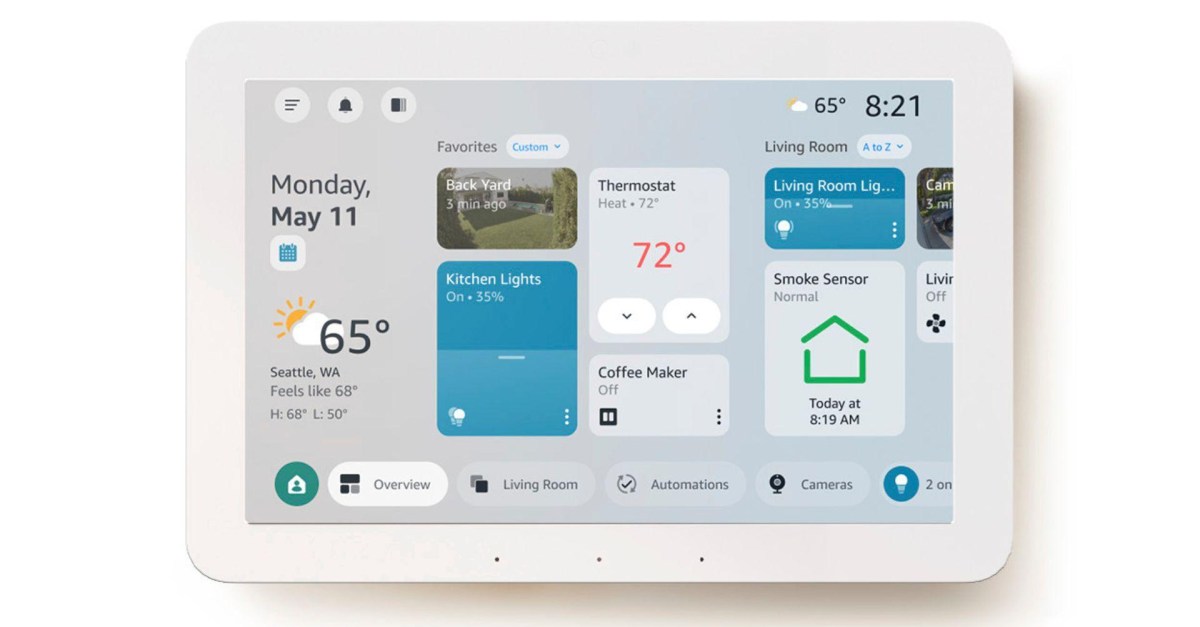
Amazon’s Echo Hub gets a customizable new look and Ring’s AI features
Resize and rearrange sections on the smart display however you like.
Resize and rearrange sections on the smart display however you like.
by Jun 11, 2026, 10:06 PM UTC Image: Amazon
 Stevie Bonifield is a news writer covering all things consumer tech. Stevie started out at Laptop Mag writing news and reviews on hardware, gaming, and AI.
Amazon’s rolling out a free software update for Echo Hub devices that gives the home screen a much-needed update to the interface it launched with in 2024. It had already added Alex Plus AI support, but the new interface has a cleaner, fully customizable layout that fits more smart home info and controls on the screen than the previous version.

The Echo Hub is also getting access to Ring AI’s Video Search feature that lets you use natural language to search through your smart home camera footage, as well as Alexa Plus summaries of detected camera events.
These are the five new features Amazon highlighted for the Echo Hub:
Organize by room – Organize your dashboard by room or function (e.g., “Bedroom,” “Downstairs”, “Climate”). Navigate to your existing groups using the bottom bar, select a group and long press to edit. Add or remove devices, drag to reorder them, and control all devices in a group simultaneously with a single tap.
Create groups – Navigate to the “Add group” button along the bottom bar, pick a name and add devices to that group. Your new group is created and will be accessible via voice control and app as well.
Arrange and resize sections and tiles – Easily add, remove and arrange sections with simple drag-and-drop actions, allowing you to create a layout that matches how you use your smart home. You can also resize the device tiles to make commonly used ones bigger.
Access granular device settings – Tap the 3 dots on any connected device to access more detailed controls. Try tapping your lights to access precise dimming (0-100%) and color adjustment or use the color wheel on compatible bulbs to select from a variety of colors. Hit the power button on each tile for instant on/off control.
Quick access to common Routines – Access your most frequently used Routines directly from the home screen using the automations section or the automations tab and trigger them with a single tap.
Follow topics and authors from this story to see more like this in your personalized homepage feed and to receive email updates.